购物车空
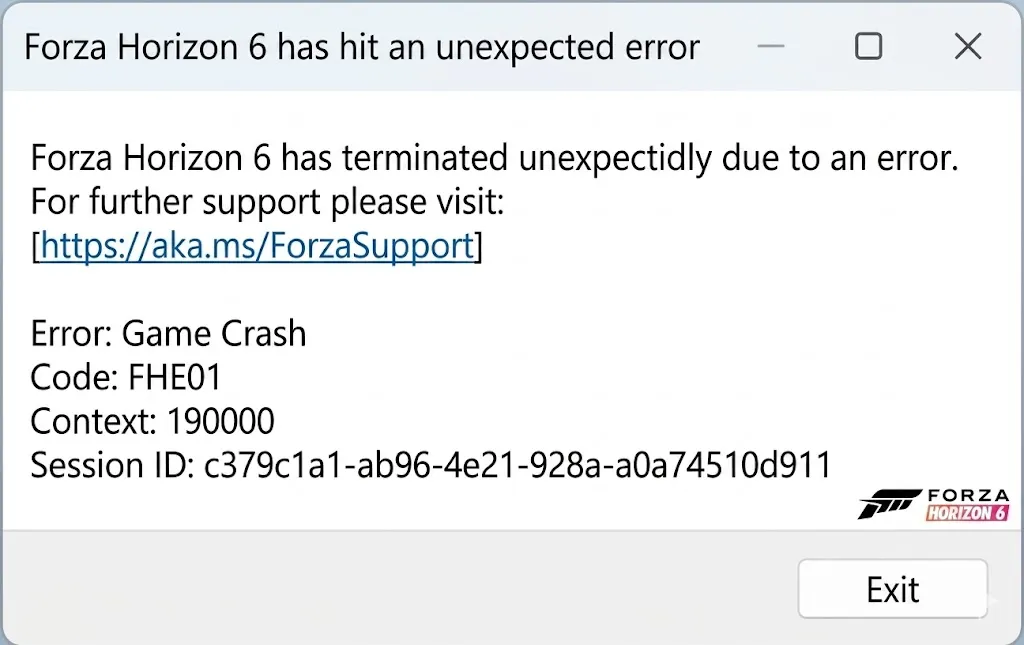
继续购物The FHE01 error in Forza Horizon 6 is one of the most common startup crash codes players encounter. It typically indicates corrupted game files, unsupported hardware, or conflicting peripherals, especially racing wheels. The game's engine is very demanding and sensitive to both software and hardware conflicts during launch.
| Cause | Description |
|---|---|
| Corrupted Game Files | Partial or failed installation, missing files, or corrupted cache. |
| Unsupported Hardware | Older GPUs like AMD Polaris/Vega (RX 400/500 series) or integrated graphics like Intel Iris Xe. |
| Racing Wheel Conflicts | Devices like Moza R5, Simucube 2 Pro, or other vJoy-based controllers can trigger FHE01. |
| RivaTuner / RTSS | Background overlay apps sometimes conflict with the game engine. |
| Temporary Files & Cache | Windows temp folder may contain corrupted data affecting startup. |
| Step | Action | Notes |
|---|---|---|
| Run as Administrator | Right-click ForzaHorizon6.exe → Properties → Compatibility → Check "Run as administrator". | Fixes permission-related crashes. |
| Disconnect Racing Wheels & Peripherals | Unplug Moza R5, Simucube 2 Pro, and other racing devices. Use keyboard/controller only. | Many users reported immediate fixes this way. |
| Clear Temporary Files | Press Win + R, type %temp%, delete all contents. | Removes potentially corrupted cache files. |
| Verify System Requirements | Confirm GPU meets minimum specs; unsupported cards may crash. | FH6 does not support older AMD GPUs or certain integrated graphics. |
| Verify Game Files | Steam: Right-click game → Properties → Local Files → Verify integrity. Xbox App: Manage → Verify/Repair. | Repairs installation issues. |
| Disable RTSS / RivaTuner | Close or uninstall RTSS. | Often solves FHE01 when using overlays. |
| Check vJoy / HID Devices | Disable vJoy or similar virtual input devices. | Conflicts with input detection may cause crashes. |
| Reinstall Microsoft C++ Redistributables | Install both x64 and x86 versions. | Fixes runtime dependencies that can trigger startup errors. |
| Move Game to C: Drive | Reinstall or move FH6 to the main system drive. | Some users bypassed crashes by relocating the game. |
| Switch to Windowed Mode (if audio issues) | Launch in windowed mode, drag error windows away. | Allows gameplay to continue despite error message. |
| System Reset (Last Resort) | Windows “Reset this PC” option, keeping files. | Drastic measure if all else fails; guarantees a clean environment. |

When dealing with persistent FHE01 crashes in Forza Horizon 6, following the recommended troubleshooting steps—like running the game as administrator, disconnecting racing wheels, clearing temporary files, and verifying game files—can save hours of frustration and get you back on the road faster. For players looking to complement their progress safely, platforms like SHANNENG provide an option to buy reliable FH6 credits, ensuring you can upgrade cars, complete events, and enjoy the full experience without risking account security or in-game setbacks.