购物车空
继续购物If your Forza Horizon 6 unpacking or decryption process is taking hours—or seems frozen entirely—you're not alone. This is a common issue on both Steam and the Xbox PC app, caused mainly by the game's massive file size and heavy compression. At over 135GB, the installer puts a serious strain on your CPU and storage drive, sometimes making the unpacking appear to stall indefinitely.
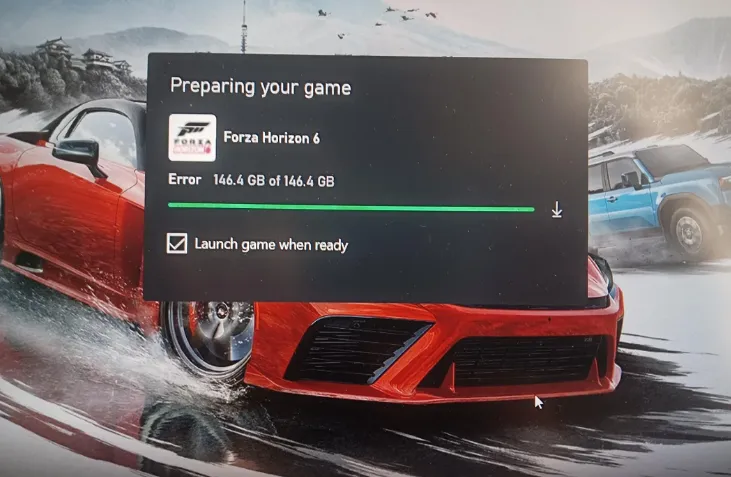
1. Delete and Re-download (“Nuclear Option”)
If your internet speed is fast, the easiest solution is to delete the preloaded game files and download the fully unpacked version from Steam. Fresh downloads bypass the local CPU decryption entirely.
2. Kill Steam Web Helper
Close Steam completely. Open Task Manager (Ctrl + Shift + Esc), end all instances of Steam Web Helper, then relaunch Steam.
3. Verify Disk Activity
Check your SSD usage in Task Manager. If reads show 0%, the unpacker may be hung. Pause the download for 10 seconds, then resume—it often forces the queue to restart.
4. Ensure Enough Free Space
The decryption process needs extra space—usually 30–50GB beyond the game size—on the drive where FH6 is installed. Without this, unpacking may freeze.
For players who want to save time and avoid the hassle of long unpacking or dealing with CPU-heavy decryption, marketplaces like SHANNENG offer a reliable way to get cheap Forza Horizon 6 credits instantly, letting you jump straight into upgrading cars, unlocking wheelspins, and enjoying the full Horizon experience without waiting hours for the game to finish unpacking.
1. Reset Gaming Services
This often solves unpacking locks:
get-appxpackage Microsoft.GamingServices | remove-AppxPackage -allusers
start ms-windows-store://pdp/?productid=9MWPM2CQNLHN
The second command opens the Microsoft Store page for Gaming Services—reinstall it, restart your PC, and try again.
2. App Reset
Go to Settings → Apps → Installed Apps → Xbox → Advanced Options. Use Terminate, then Reset. Relaunch the installer afterward.

Unpacking errors can be frustrating, but following these steps usually resolves the problem. If nothing works, reaching out to Microsoft Support or Steam support with your logs can help.