购物车

购物车空

继续购物
总计 ¥0.00
结算
首页 / 博客
How to Change Your Radio in Forza Horizon 6?
Zubo
May 20, 2026
1339

One of the small but satisfying touches in Forza Horizon 6 is the ability to switch between the game's radio stations while driving. Whether you want to blast electronic beats through Tokyo City streets or enjoy chill tunes while cruising the Alpine passes, knowing how to manage your in-game radio makes the ride much more immersive.
Default Controls

How to Change Your Radio in Forza Horizon 6?

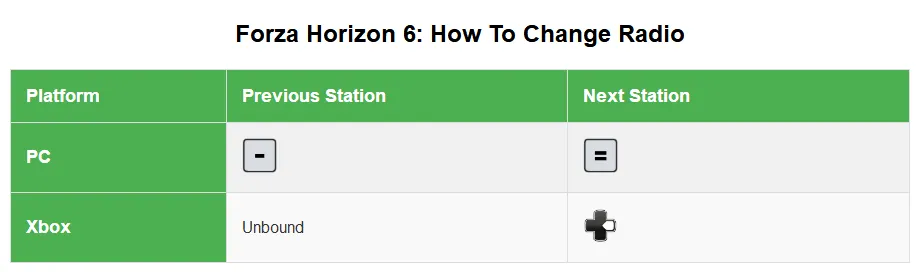
Changing radio stations in FH6 is straightforward if you know the controls:

  • Xbox / Controller: Press D-pad Right to cycle forward through stations. Keep pressing until you reach your favorite station or "Radio Off."
  • PC Keyboard: Press Equals (=) to go to the next station, or Hyphen (-) to move to the previous one.
  • Turn Radio Off: Simply cycle through all available stations until the HUD reads "Radio Off."

This simple control allows you to quickly switch between stations without pulling up menus mid-drive, perfect for races or free-roam cruising.

Customizing Radio Controls

If you prefer a custom button layout, FH6 allows full remapping:

  1. Press Pause and open Settings.
  2. Select Controls → Change Input Mapping.
  3. Scroll down to Radio Previous or Radio Next.
  4. Map these functions to your preferred buttons, like D-pad Left for previous station.

By default, only the “Radio Next” action is mapped, so adding a “Radio Previous” shortcut makes switching stations much faster and more intuitive.

For those looking to fully unlock the game and focus on seamless exploration and racing without limits, SHANNENG offers a safe, fast, and reliable way to buy FH6 credits online, giving you instant access to cars, upgrades, and more ways to enjoy every station in the game.

Buy Forza Horizon 6(FH6) Credits

Adjusting Volume and Audio Settings

Sometimes the radio might seem unresponsive or too quiet. Here's what to check:

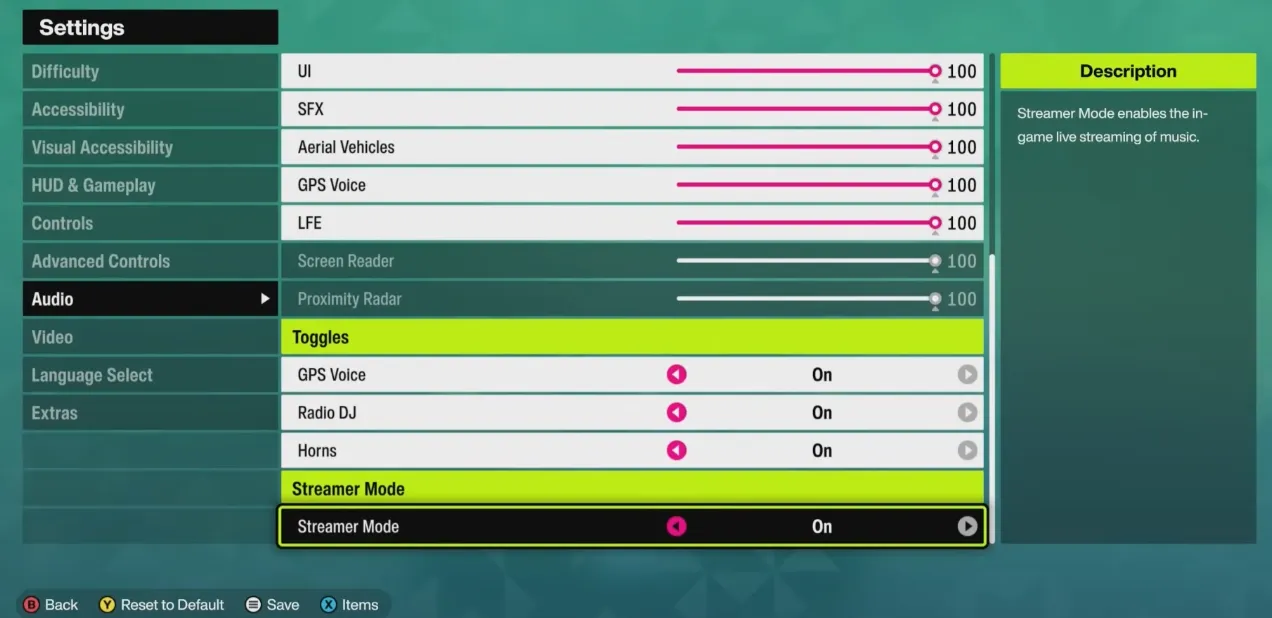
  • Music Volume: Open Settings → Audio and make sure Music Volume is not at 0%.
  • Streamer Mode: When turned on, this blocks copyrighted music to prevent streaming issues. Toggle it off if you want all stations available.
  • Other Audio Tweaks: Adjust SFX and Voice sliders if needed to balance in-game sounds with your radio.

These tweaks ensure the music comes through clearly, whether you're tackling the Bandai‑Azuma Skyline or cruising Tokyo highways.
How to Change Your Radio in Forza Horizon 6

Tips for Enjoying Your FH6 Radio

  • Plan your playlist: Some stations are better suited for speed challenges; others are great for relaxed exploration.
  • Quick switch: For racing, mapping both forward and backward radio buttons lets you skip tracks efficiently.
  • Streamer Mode awareness: If you plan to stream your gameplay, leaving this on keeps your broadcast copyright-safe.

Changing the radio in Forza Horizon 6 is a minor detail that enhances the overall driving experience. With these controls and customizations, you can always keep the right soundtrack for your adventure, whether you're drifting through Yuki no Otani or speeding along coastal highways.


相关文章
流亡黯道2(國際版)
侠盗猎车手5
暗黑破壞神 4
流亡黯道(國際版)
地產大亨 GO!
火炬之光:無限
辐射76
沙丘觉醒
棒球 25
College Football 27
使命召唤:黑色行动7
侠盗猎车手6
罗布乐思
Madden NFL 27
种植花园
FC 27
NBA 2K27
无烬战争
偷走脑红
森林中的99夜
绝地潜兵2
宝可梦传说 ZA
永恆之塔2
ARC Raiders
创世灰烬
美國職棒大聯盟 26
恐惧之谜
天堂:經典版
Dark and Darker
失落星船:马拉松
VAMPIR:血之繼承者
暗黑破壞神 2: 獄火重生
英雄围城(Hero Siege)
晶陨(Crystalfall)
天堂W - 东南亚服
帝国神话:王权