In AION 2, macros are an officially supported feature designed to help players maintain high damage-per-second (DPS) and ease the strain of repetitive inputs. The system primarily focuses on alternating sequences of Left-Click (LMB) and Right-Click (RMB) abilities, which are the foundation of combat rotations.
Setting Up In-Game Macros
To access and configure your macros:
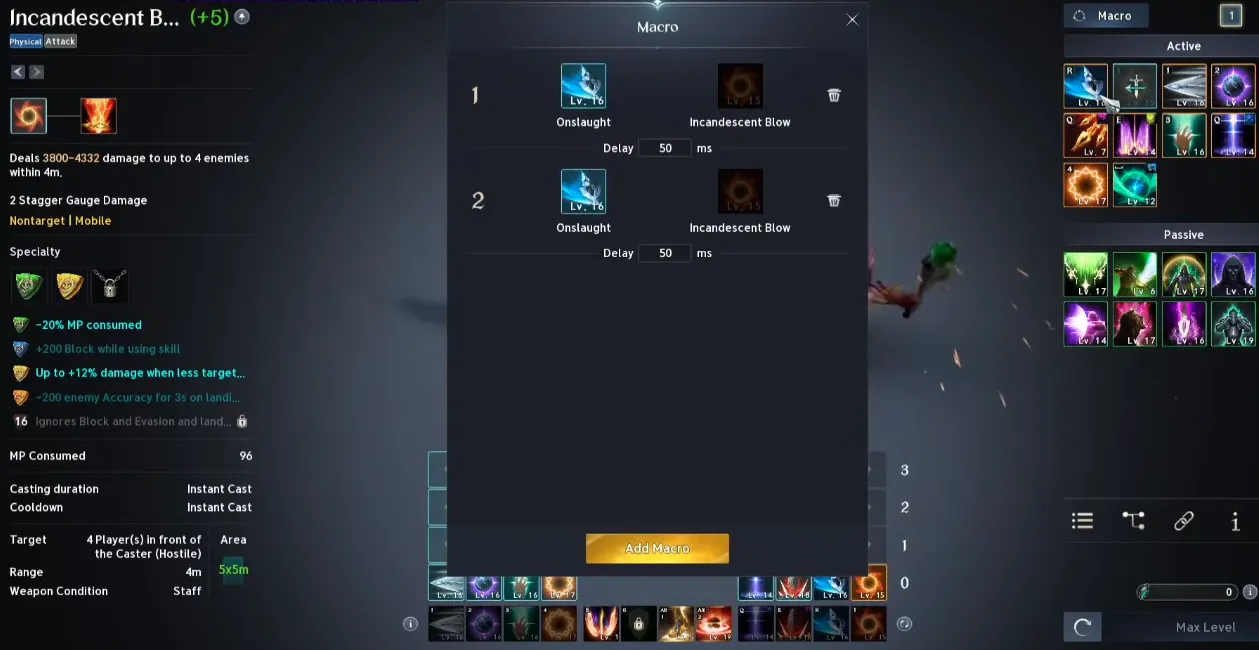
- Open the Macro Menu: Press U (default) or navigate to the System Menu and select "Macro."
- Add New: Click the "New Macro" button at the bottom.
- Name and Icon: Give it a name and select an icon that you will drag onto your hotbar later.
- Enter Commands: You can drag skills directly from your skill window into the macro edit box, or type them manually. Syntax: /Skill [Skill Name]. Delays: Between skills, you must add a delay to account for the Global Cooldown (GCD) and animation time. Example:
/Skill Ferocious Strike II
/Delay 1.5
/Skill Rage II - Save: Click "Save" and drag the icon from the Macro window to your action bar.
How to Use During Combat
- Activation: You must hold down the assigned macro key to keep the sequence running. It is not a "one-press" automation.
- Manual Overrides: While holding the macro key, it will automatically pause if you manually trigger another skill that is off-cooldown.
- Auto-Targeting: Most players combine these macros with the game's auto-target setting to streamline combat.
Key Tips for Aion 2 Macros
- Animation Canceling: The primary goal for many players is to replicate ideal "animation cancel" rotations flawlessly.
- Testing: Always test your new macro on a DPS dummy or training NPC to ensure it doesn't break your skill chains or reduce your damage.
- Ping Sensitivity: The system is highly dependent on your connection. If your ping is high, you will need longer delays between skill commands to ensure they register correctly.
- Optimal Delays: Start with a 50-millisecond delay and adjust based on your latency (ping) to ensure smooth execution.
- Chain Management: Macros work best for repeating your class's default 3-chain skill on left-click and 2-chain on right-click.
- Active Usage: You may need to hold down or spam the macro key, allowing it to pause for manual skill usage when necessary.
- Avoid AFK Farming: While permitted for enhancing combat, using macros for automatic farming (AFK) is not allowed.
Important Note: While in-game macros are permitted, using external third-party software for "auto-farming" kinah or endless repeating loops can lead to account bans for bot-like behavior.