购物车空
继续购物When you jump into Forza Horizon 6, the first thing that matters is how the game looks and runs. The graphics settings give you full control over every detail, from car reflections to environmental textures, letting you tailor your experience for maximum performance or maximum beauty. This guide walks you through the optimal settings for PCs, mid-range rigs, and handheld devices alike.
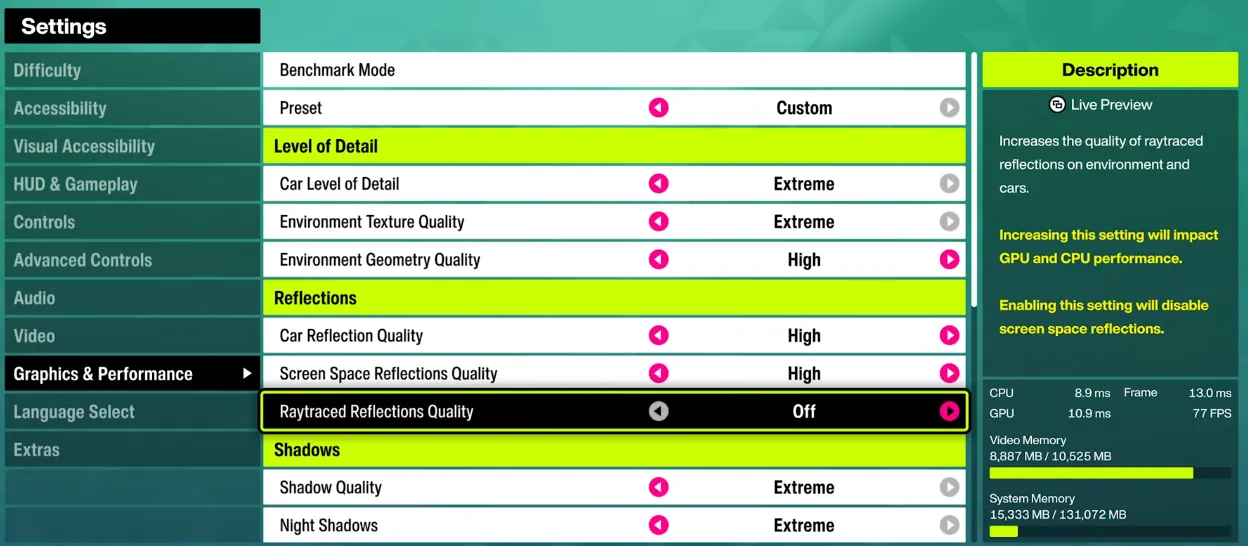
| Setting | Recommendation / Explanation |
|---|---|
| Resolution | Set to your monitor's native resolution (4K for high-end PCs). |
| Frame Rate | Unlocked is ideal; set a cap if you want stability. |
| V-Sync | Turn off if you prefer unlocked FPS. |
| Upscaling (Nvidia) | DLSS: Balanced for 4K, Quality for 1080p, Performance for 4K upscaling. |
| Upscaling (AMD) | FSR 3.1.5 to boost performance without heavily compromising visuals. |
| Upscaling (Intel) | XeSS to improve frame rates while maintaining image quality. |
| Field of View (FoV) | Adjust to personal preference; doesn't significantly affect performance. |
| Setting | Effect | Mid-Range PC | Handheld |
|---|---|---|---|
| Car Level of Detail | Mesh/detail quality of cars; high VRAM impact | Ultra | High |
| Environment Texture Quality | Resolution of world textures | High | High |
| Environment Geometry Quality | Mesh quality for objects | High | High |
| Car Reflection Quality | Interior/exterior reflections | High | High |
| Screen Space Reflections Quality | Non-ray traced reflections | Off | Medium/Off |
| Ray Traced Reflections Quality | Ray traced reflections | Medium | Off |
| Shadow Quality | Shadow resolution & update rate | High | Low |
| Night Shadows | Shadows from streetlights/headlights at night | Ultra | Off |
| Screen Space Global Illumination (SSGI) | Ambient lighting | Off | Medium |
| Ray Traced Global Illumination (RTGI) | Realistic lighting with RT | Low | Off |
| Shader Quality | Material and lighting fidelity | Ultra | High |
| Deformable Terrain Quality | Dirt/mud effects | Extreme | Medium |
| Particle Effects | Debris and spray effects | High | Medium |
| Volumetric Fog Quality | Fog density and detail | Ultra | Medium |
| Lens Effects & Motion Blur | Purely aesthetic | Personal choice | Personal choice |

| Tip | Recommendation / Explanation |
|---|---|
| Start with Presets | High + RT is solid for mid-range GPUs (smooth 60–70 FPS without DLSS). Ultra + RT looks better visually but can significantly drop FPS on mid-range cards. |
| Balance VRAM Usage | If VRAM is limited, lower environmental textures first before reducing car detail. |
| Ray Tracing | Only enable ray tracing on RT-capable cards; otherwise, stick to non-RT reflections. |
| Handheld Performance | Use a mix of medium and high presets on Xbox Ally X to achieve 50–60 FPS when plugged in; unplugged, expect around 30 FPS, still playable for casual sessions. |
| Benchmarking | Use in-game benchmarks for guidance, but test in the open world to check reflections, puddles, and particle effects in real gameplay. |
In Forza Horizon 6, finding the right graphics settings is all about balancing stunning visuals with smooth performance, whether you're on a high-end PC, mid-range rig, or handheld console. By carefully adjusting resolution, frame rate, upscaling, and the detailed graphics & performance options, you can enjoy realistic car reflections, immersive environments, and consistent FPS. For players looking to accelerate their progress or unlock premium upgrades, SHANNENG is the go-to platform to buy safe Forza Horizon 6 credits, ensuring instant delivery, secure transactions, and a seamless way to enhance your Horizon experience.