购物车

购物车空

继续购物
总计 ¥0.00
结算
首页 / 博客
Forza Horizon 6 Won't Launch: How to Fix It on PC
Zubo
May 20, 2026
912

Forza Horizon 6 is an amazing racing experience, but nothing is more frustrating than clicking “Play” and watching nothing happen. If you're stuck at the splash screen, black screen, or the game refuses to open entirely, you're not alone. Here's a detailed guide from a player's perspective on how to get FH6 running again.
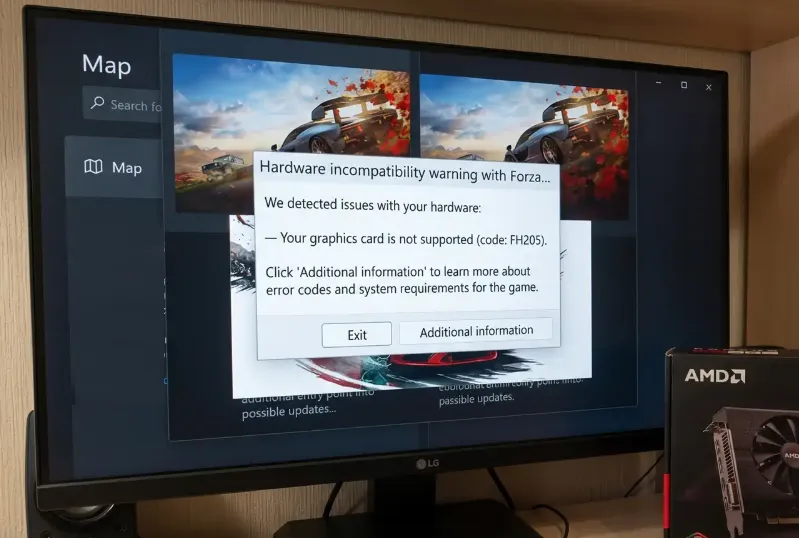
Forza Horizon 6 Won't Launch

1. Disable Overlays and Background Apps

Many launch problems stem from conflicts with third-party overlays or monitoring software. Programs like MSI Afterburner, RivaTuner (RTSS), Discord overlay, and NVIDIA GeForce Experience can interfere with Forza's anti-cheat or startup routines.

What to do:

  • Close MSI Afterburner & RTSS completely. If you must leave RTSS open, set “Application Detection Level” to None.
  • Disable in-game overlays in Discord and GeForce Experience.
  • Make sure no other monitoring tools or performance apps are running in the background.

2. Enable AES-NI in BIOS

Some PCs, especially pre-built systems or Acer machines, might have AES-NI disabled in the BIOS. This CPU instruction set is required for the game's encryption and can prevent it from launching.

Steps:

  1. Restart your PC and press your BIOS key (F2, Del, or the key your motherboard specifies).
  2. Go to Advanced Settings → CPU Configuration.
  3. Enable AES-NI or AES Instructions.
  4. Save and reboot into Windows.

3. Repair or Reinstall Gaming Services

The Xbox / Gaming Services backend is essential for FH6 on PC. If corrupted, you might see errors like E:0-e9 Load Failed.

Fix it:

  1. Open PowerShell as Administrator.
  2. Run:
    get-appxpackage Microsoft.GamingServices | remove-AppxPackage -allusers
    start ms-windows-store://pdp/?productid=9MWPM2CQNLHN
  3. Install or update Gaming Services from the Microsoft Store.
  4. Restart your PC and try launching the game.

4. Verify Game Files

Corrupted or missing files from a patch or download can block the game from starting.

Steam:

  • Right-click FH6 in your Library → Properties → Installed Files → Verify Integrity of Game Files.

Xbox App:

  • Click the three dots next to FH6 → Manage → Files → Verify and Repair.

5. Check Installation Path Length (Steam)

Steam users may run into launch issues if the game's folder path is too long. FH6 can fail if the path exceeds 59 characters.

Solution:

  • Move your installation closer to the root of your drive, e.g., C:\SteamLibrary\steamapps\common\ForzaHorizon6.

6. Try the Alt+Tab Trick

If the game launches to a black screen or freezes at logos, switching focus can help.

How:

  1. Launch FH6.
  2. When the window opens, press Alt + Tab to go to the desktop.
  3. Wait 15–30 seconds, then switch back to the game.

7. Run as Administrator

Sometimes Windows blocks the game due to permission issues.

Steps:

  • Navigate to your game folder.
  • Right-click the FH6 executable → Properties → Compatibility → Check Run this program as an administrator.
  • Apply changes and launch.
Buy Forza Horizon 6(FH6) Credits

Getting FH6 to launch can require multiple tweaks depending on your system. Start by disabling overlays, checking Gaming Services, and verifying game files. Many players also find that BIOS settings like AES-NI or simply running the game as Administrator solve the stubborn startup issues. With these fixes, you should be back in the driver's seat without wasting hours troubleshooting.

相关文章
流亡黯道2(國際版)
侠盗猎车手5
暗黑破壞神 4
流亡黯道(國際版)
地產大亨 GO!
火炬之光:無限
辐射76
沙丘觉醒
棒球 25
College Football 27
使命召唤:黑色行动7
侠盗猎车手6
罗布乐思
Madden NFL 27
种植花园
FC 27
NBA 2K27
无烬战争
偷走脑红
森林中的99夜
绝地潜兵2
宝可梦传说 ZA
永恆之塔2
ARC Raiders
创世灰烬
美國職棒大聯盟 26
恐惧之谜
天堂:經典版
Dark and Darker
失落星船:马拉松
VAMPIR:血之繼承者
暗黑破壞神 2: 獄火重生
英雄围城(Hero Siege)
晶陨(Crystalfall)
天堂W - 东南亚服
帝国神话:王权