购物车

购物车空

继续购物
总计 ¥0.00
结算
首页 / 博客
How to Add a Created Player to Your Roster - MLB The Show 26
Zubo
May 18, 2026
171

Adding a created player to your roster in MLB The Show 26 is simple once you know the steps. Whether you're building a superstar from scratch or customizing a unique player for your favorite team, this guide will get them onto the field in no time.
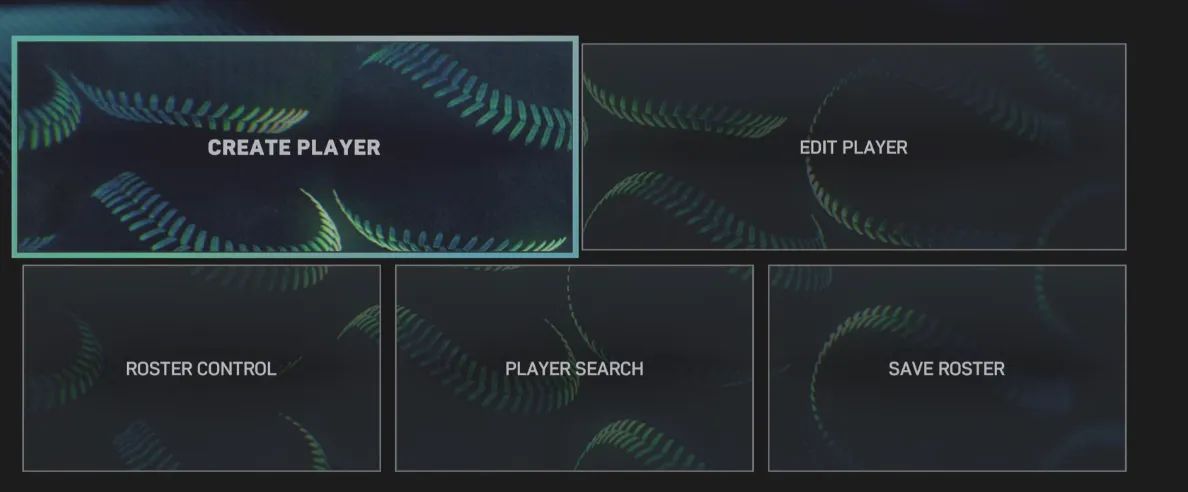
Create Player to Your Roster - MLB The Show 26

Step 1: Create Your Player

  • From the main menu, navigate to Create > Player.
  • Customize their appearance, attributes, and equipment.
  • Save your creation to lock in your settings.

This is the foundation—you can tweak skills and gear as much as you like before adding them to a roster.

If you want to expand your roster without spending hours in the creation menu, SHANNENG makes it easy to buy MLB 26 Players, giving you instant access to fully customized athletes and letting you jump straight into building your dream team in MLB The Show 26.

Step 2: Access Roster Control

  • Go back to the main menu and select Create > Roster Control.
  • This is where you manage all created players and modify team lineups.

Step 3: Move the Player to Free Agents

  • In Roster Control, find the Created Players section.
  • Select your player and assign them to the Free Agent pool.

This step is important because MLB teams can only add players from Free Agency.

Step 4: Assign Your Player to a Team

  • Switch to the Free Agents tab in Roster Control.
  • Choose your created player and move them to your preferred MLB team.

Now they are officially part of the roster and ready to appear in games.

Step 5: Save the Custom Roster

  • Head to Settings > File Management > Save Roster.
  • Give it a clear, memorable name like "Custom_Roster_With_Player" so you can easily locate it later.

Saving ensures your changes stick and can be used across modes.

Step 6: Start a Franchise or Play Mode

  • Launch New Franchise or your desired game mode.
  • When asked for a roster, select Use Custom Roster and pick the file you just saved.

Your created player is now available for drafting, call-ups, or starting lineups.

Getting your custom player into the roster opens up new ways to enjoy MLB The Show 26, letting you experiment with talent, team balance, or even create a dream roster. By following these steps, you can make sure your player hits the field exactly where you want them.

For players looking to accelerate their progress or unlock top-tier players faster, SHANNENG offers a reliable option to get MLB 26 Stubs for Sale, providing a safe and instant way to enhance your roster and fully enjoy all the customization and gameplay opportunities in MLB The Show 26.

相关文章
流亡黯道2(國際版)
侠盗猎车手5
暗黑破壞神 4
流亡黯道(國際版)
地產大亨 GO!
火炬之光:無限
辐射76
沙丘觉醒
棒球 25
College Football 27
使命召唤:黑色行动7
侠盗猎车手6
罗布乐思
Madden NFL 27
种植花园
FC 27
NBA 2K27
无烬战争
偷走脑红
森林中的99夜
绝地潜兵2
宝可梦传说 ZA
永恆之塔2
ARC Raiders
创世灰烬
恐惧之谜
极限竞速:地平线6
天堂:經典版
Dark and Darker
失落星船:马拉松
VAMPIR:血之繼承者
暗黑破壞神 2: 獄火重生
英雄围城(Hero Siege)
晶陨(Crystalfall)
天堂W - 东南亚服
帝国神话:王权