购物车

购物车空

继续购物
总计 ¥0.00
结算
首页 / 博客
MLB The Show 26 PCI Sensitivity Recommended Settings
Zubo
Mar 16, 2026
658

In MLB The Show 26, the newly introduced PCI Sensitivity slider allows you to scale how fast or slow your Plate Coverage Indicator (PCI) moves when using the "Zone" hitting interface.

How Plate Coverage Indicator (PCI) Works

The slider adjusts the relationship between your analog stick movement and the PCI's speed on screen:
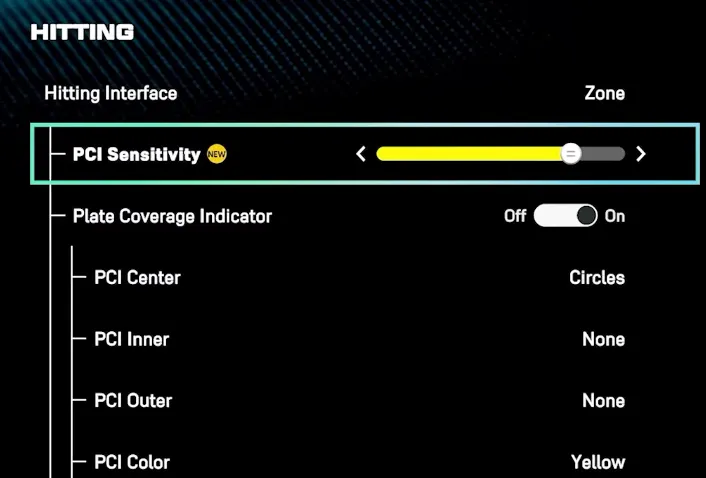
MLB The Show 26 PCI
  • High Sensitivity: The PCI "snaps" across the zone, allowing for faster reactions to high-velocity fastballs and inside heaters.
  • Low Sensitivity: The PCI moves more slowly and deliberately, which helps prevent overshooting the ball but may feel like "input lag" against elite velocity.

Recommended PCI Settings

While the "best" setting is a matter of personal preference, current community and expert recommendations include:

  • For Competitive Players: Many top players recommend starting at Maximum (100%) to ensure you can reach every part of the zone quickly.
  • For Better Control: If you find yourself consistently "slamming" the PCI past the ball, try lowering the sensitivity to 60%–75% for smoother, more precise tracking.
  • Finding Your Feel: A common strategy is to start at the default setting and adjust by one or two notches at a time until the movement feels natural to your thumb's muscle memory.

Related Hitting Settings:

  • Hitting Interface: Zone.
  • PCI Anchor: Off (for more freedom) or preset to a specific zone if you struggle with certain pitch locations.
  • PCI Style: Bat or Diamonds (common "meta" choices).

In MLB The Show 26, finding the right balance with the PCI Sensitivity slider is key to refining your hitting performance. Whether you prefer a more responsive PCI for fastballs or a slower, more controlled feel for breaking pitches, adjusting this setting can give you the precision you need to excel. If you're looking to enhance your experience and get ahead in the game, you might want to buy cheap MLB 26 stubs PS5 from trusted platforms like SHANNENG. With their competitive prices and reliable delivery, SHANNENG offers an easy way to boost your gameplay without breaking the bank.

How to Change PCI

You can find this slider by navigating through the following menus:

  1. Settings
  2. Gameplay (or Controls)
  3. Batting
  4. Scroll down to PCI Sensitivity under the Zone interface section.

Note: You must have your Hitting Interface set to Zone for this setting to be active.

相关文章
流放之路2(国际服)
侠盗猎车手5
暗黑破壞神 4(國際版)
流亡黯道(國際版)
地产大亨GO
火炬之光(国际服)
辐射76
沙丘觉醒
棒球 25
大学生橄榄球26
使命召唤:黑色行动7
侠盗猎车手6
罗布乐思
麦登橄榄球26
种植花园
FC 26
NBA 2K26
无烬战争
偷走脑红
森林中的99夜
绝地潜兵2
宝可梦传说 ZA
永恒之塔2
ARC Raiders
创世灰烬
恐惧之谜
极限竞速:地平线6
天堂:经典版
Dark and Darker
失落星船:马拉松
VAMPIR:血之繼承者
暗黑破壞神 2: 獄火重生
晶陨(Crystalfall)